← All work
FITKITS · Sports bookingShipped as FITKITS

Finding and booking a place to play.

Venue discovery, time-slot selection, and social play in one mobile experience.

Role
UI/UX designer
Type
Client project
Tools
Figma, Ux Pilot, Google Stitch
Timeline
Nov 2025 – Jan 2026
Platform
Android
Discover a venue
Discover a venue
Review the venue
Review the venue
Choose when to play
Choose when to play
The brief

The client wanted a mobile experience that brought sports venues, studios, recovery services, and community activities together. The core design challenge was helping people move from browsing a venue to selecting a slot without losing context.

What I owned

I designed discovery, venue details, booking, event hosting, and community flows entirely in Figma, then handed the design to the developers.

Starting point

Client requirements and a review of competing venue-booking experiences.

How I worked

I started with a competitive analysis: how court-booking apps and gym and class apps present venues, slots and prices, and which services each one covers. The gaps in that comparison set the scope. Then I designed the app in Figma and handed it to the developers.

Design decisions

How it takes shape.

Decision 01 · Start from what others leave out

What I did

Before designing a screen, I went through the court-booking and fitness apps people already use. I compared how each one lists venues, shows slots and prices, and what services it offers, then mapped where FITKITS could be different.

Why

Court apps are good at booking a slot but stop at sport. Fitness apps handle classes but not courts or recovery. Neither gives people a reason to come back after the game. That gap became the product: courts, studios and recovery in one place, with a social layer on top.

Court-booking appsGym & class appsFITKITS
Book courts and turfsYes✓No—Yes✓
Book studio classesNo—Yes✓Yes✓
Recovery: ice baths, therapyNo—SomeYes✓
Public games anyone can joinYes✓No—Yes✓
Social events beyond sportNo—No—Yes✓
Community feed after the gameSomeNo—Yes✓
Decision 02 · Discovery by category

Discovery by category

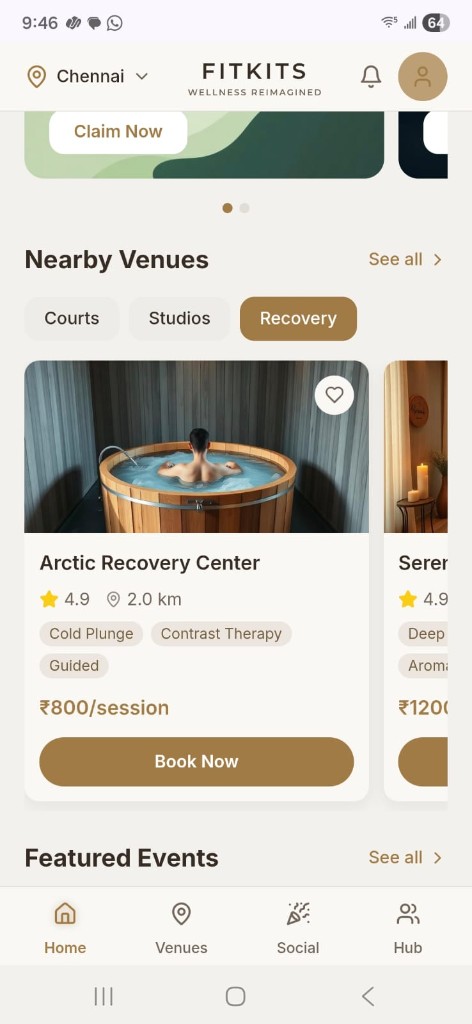
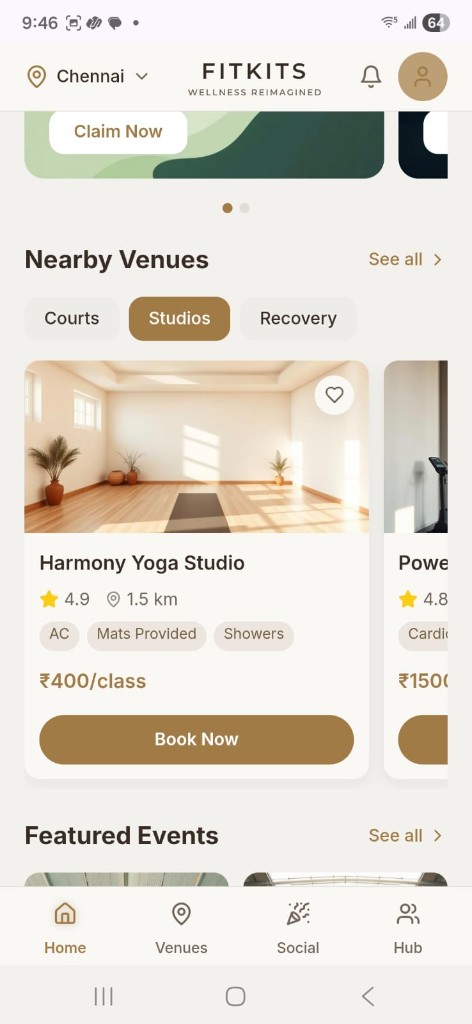
Nearby Venues uses three tappable filter chips - Courts, Studios, Recovery - that swap the horizontal venue carousel without leaving home. Each card leads with a full-width photograph, then stacks name, star rating, distance, amenity tags, price per session, and a bronze Book Now button.

Recovery filter active - Arctic Recovery Center card with rating, amenity tags, price, and Book Now.

Why it matters

People rarely open the app with a venue in mind. They know what they want to do. Courts, Studios and Recovery match that intent, and switching in place keeps them on the home screen instead of a search page.

Decision 03 · Venue information in one place

Venue information in one place

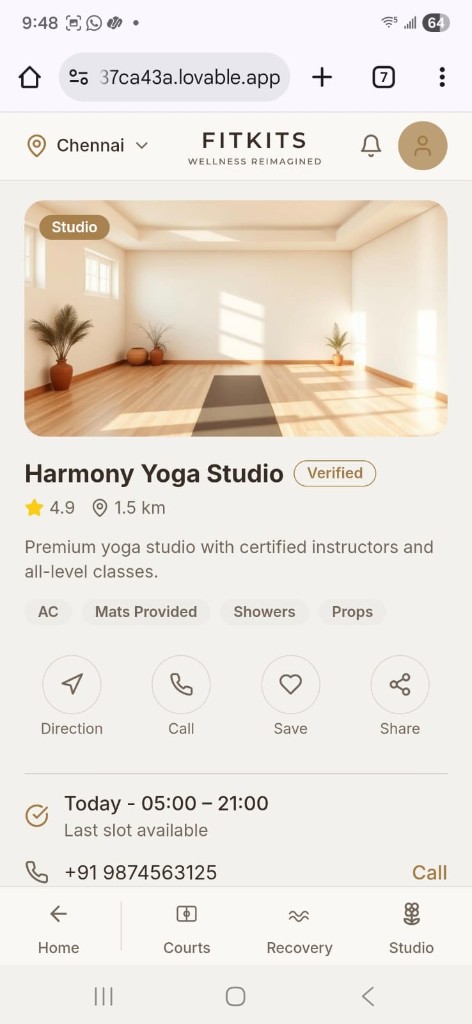
Tapping a venue opens a detail page with a full-width hero photograph, verified badge, rating and distance, amenity tags, and a row of quick-action buttons: Direction, Call, Save, and Share. Pricing (₹400/hr) and today's hours sit below with a persistent Select Slot CTA.

Harmony Yoga Studio detail - hero photo, Verified badge, amenity tags, and quick-action row.

Why it matters

Before paying for a venue they have never visited, people want proof: real photos, a verified badge, amenities, and a way to call or get directions. Answering all of that on one page makes Select Slot the obvious next step.

Decision 04 · A focused slot-selection screen

A focused slot-selection screen

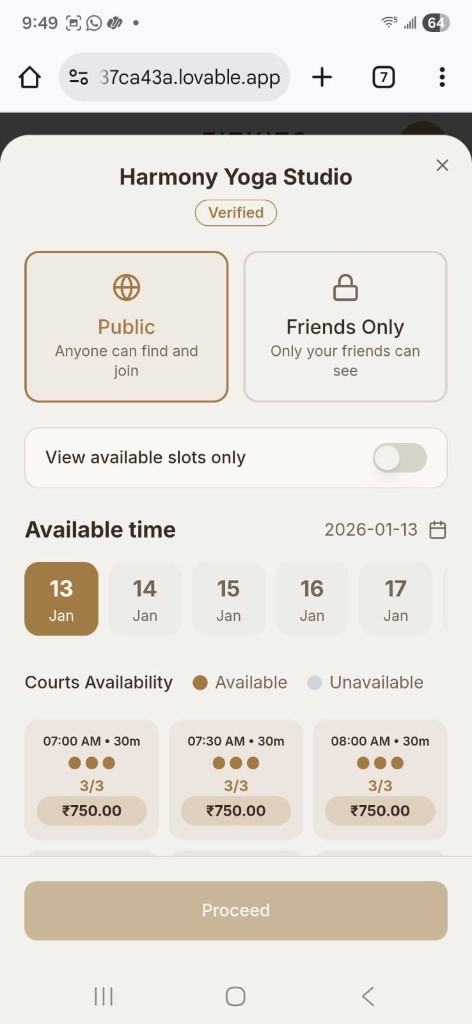
Select Slot opens a bottom sheet with Public/Friends Only visibility toggle, a horizontal date picker, and a Courts Availability grid. Each slot card shows time, duration (30m), spot count (3/3), and price (₹750). A player-count stepper sits below the grid before Proceed.

Slot picker - date scroll, availability grid with price per slot, and Proceed CTA.

Why it matters

Booking a court is a group decision: when, how long, how many players, and who can join. The sheet keeps those choices together, and the Public / Friends Only toggle lets a half-full game find more players.

Decision 05 · Events grouped by activity

Events grouped by activity

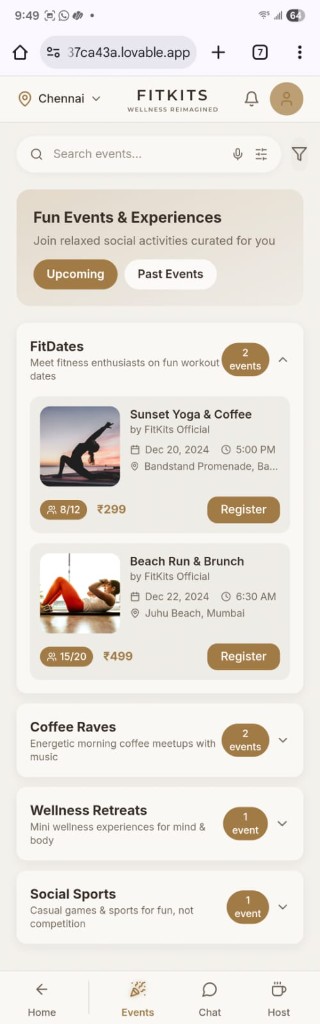
The Events tab groups social activities into expandable categories: FitDates, Coffee Raves, Wellness Retreats, and Social Sports. Each category shows an event count badge and expands to reveal event cards with photo, host, date, time, location, capacity, price, and a Register button.

Events tab - FitDates expanded with Sunset Yoga & Coffee and Beach Run & Brunch event cards.

Why it matters

FITKITS is as much about meeting people as playing. Grouping events by mood (FitDates, Coffee Raves, retreats, sports) lets people browse the way they decide, and the count on each group shows where the activity is.

Stay connected after a game
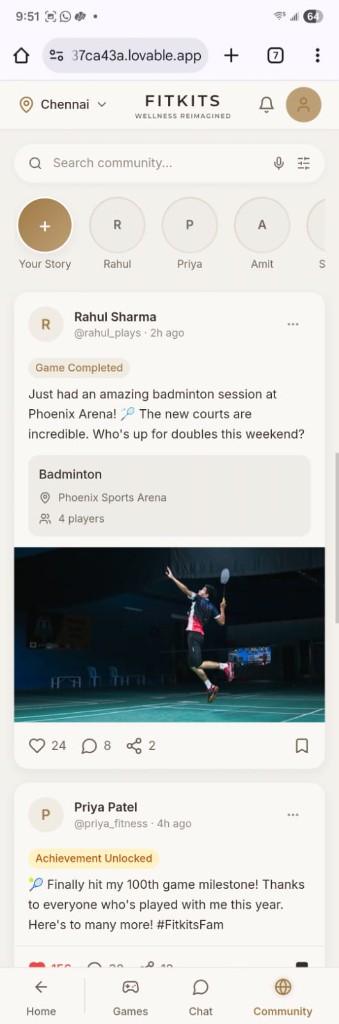
Stay connected after a gamePlayer posts, activity and shared games in the same app.
Bring people together
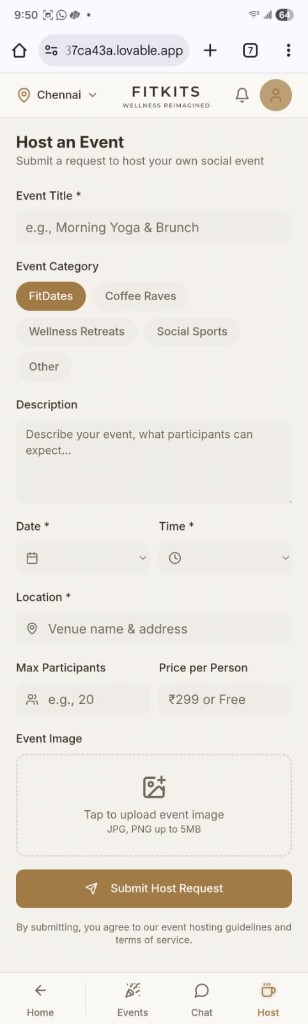
Bring people togetherActivity, date, location, capacity and price in one request.

Where it landed

Shipped as FITKITS.

Delivered the Figma screens and reusable components to the development team for implementation.

Reflection

This project gave me practice keeping a consistent visual language across discovery, booking, and community screens.

A useful next step would be to review booking edge cases, such as unavailable slots and cancellation, and test the journey with people who book sports venues.